2.9 Inch 320×120 Bar TFT: Specs, Interfaces, and Use Cases
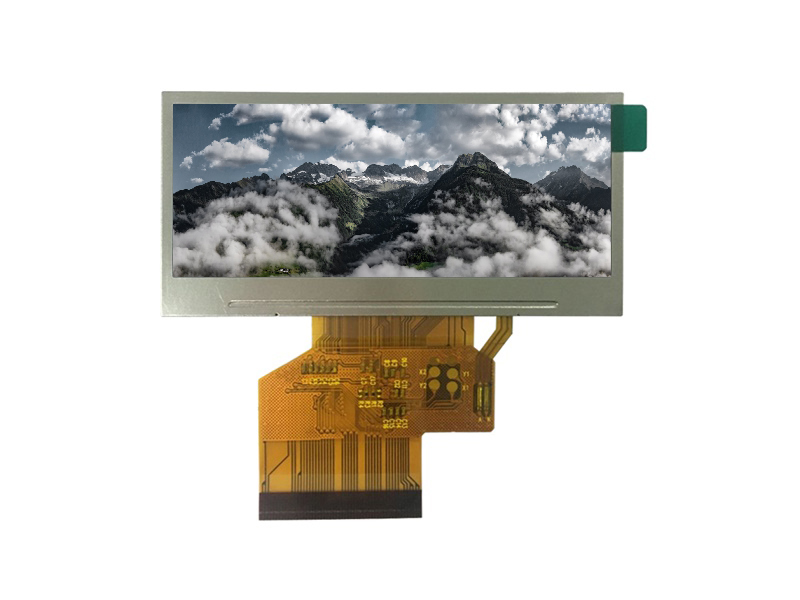
A 2.9-inch bar TFT with a 320×120 resolution is a small, wide display built for one line of information: a status message, a label, a small ticker, or a compact gauge readout. Its low…
Part of the Bar-Type & Stretched Displays guide — 15 articles on aspect ratios, interfaces and multi-bar networks.
The 2.9-Inch Bar Form Factor: Size, Pixels, and Power
The format is defined by its diagonal and its wide, short active area: roughly 320 pixels across by 120 tall. The pixel count—about 38,000—is small enough that full-frame updates are quick and frame buffers fit in modest MCU memory. Power follows the backlight: small bars with a handful of LEDs draw little current, which suits battery and low-power products. Exact outline, active area, and power values come from the panel datasheet.
Use Cases for a 2.9-Inch Bar TFT Display
Typical uses include instrument readouts and status lines on devices, small tickers and signage elements, label displays on industrial equipment, and compact meter panels where a full screen is overkill. The common thread is a small amount of changing content in a wide format, exactly what a 320×120 panel is sized for.
Interface Options for Driving a 2.9-Inch Bar TFT
Small bar panels are commonly driven over SPI or an MCU-style interface, and some support RGB18-class parallel input for hosts with a display controller. SPI suits low-pin-count MCU builds; the interface landscape for bar displays is covered by the bar interface guide, and the practical driving path for small bars by the SPI/I2C implementation guide. Choose by host support and update needs.
Optical Specifications: Brightness and Viewing Angle
Brightness and viewing angle follow the application: an indoor status display needs less luminance than a window-side ticker. Specify the ambient scenario and choose the panel’s brightness with margin, and confirm the viewing angle covers the operator’s position. Outdoor brightness engineering belongs to the bar brightness guide; the spec here is set by the product environment.
MCU Driving Notes for the 2.9-Inch Bar TFT
Driving a 2.9″ bar from an MCU follows the standard sequence—wire power and SPI/I2C lines, initialize the controller, set the memory window, and write pixels—with partial updates for changing content. Because the panel is small, full refreshes are fast and partial updates keep the host load low. The detailed wiring and initialization walkthrough lives in the small-bar driving guide; this page covers the 2.9″ product context.
Custom Options: FPC, Connector, and Wide-Temperature
Like most modules, a 2.9″ bar can be customized: FPC length and exit direction, connector choice, and wide-temperature builds for outdoor or vehicle use. Custom options are defined by drawing and sample; the custom bar design guide covers cutout, FPC, and bonding decisions for bar formats generally.
Frequently Asked Questions
What devices use a 320×120 bar display?
Instrument readouts, status and label displays, small tickers, and compact meter panels where a small, wide information line fits the product better than a full screen.
What interface does the 2.9-inch bar use?
Small bars commonly run over SPI or an MCU-style interface; RGB18-class parallel options exist for hosts with a display controller. Confirm the panel’s supported interfaces in the datasheet.
How does this bar connect to larger bar displays?
Larger bars with more pixels need higher-bandwidth interfaces such as RGB, LVDS, or MIPI; the bar interface guide explains how the choice scales with size and content.
If a compact bar display fits your product, confirm the size, interface, and environment against the datasheet, then plan the custom options. CDTech supports bar-type LCD specification across the bar display range—contact us with your requirement.
Related articles
 How to Drive a Small Bar TFT Screen with SPI or I2CBar-Type & Stretched Displays
 Synchronising a Network of Bar Displays: Timing, Drift and Content AlignmentBar-Type & Stretched Displays
 Shelf-Edge Displays for Retail: Brightness, Refresh and Total Cost of OwnershipBar-Type & Stretched DisplaysCut-Glass vs Native Bar Displays: Which One Survives a Real DeploymentBar-Type & Stretched Displays