How Do You Choose an Industrial LCD Display?
Choose an industrial LCD by fixing seven parameters first: size, resolution, brightness, viewing angle, interface, operating temperature, and backlight lifetime. Match them to the enclosure, the ambient light, the host processor, and the duty…
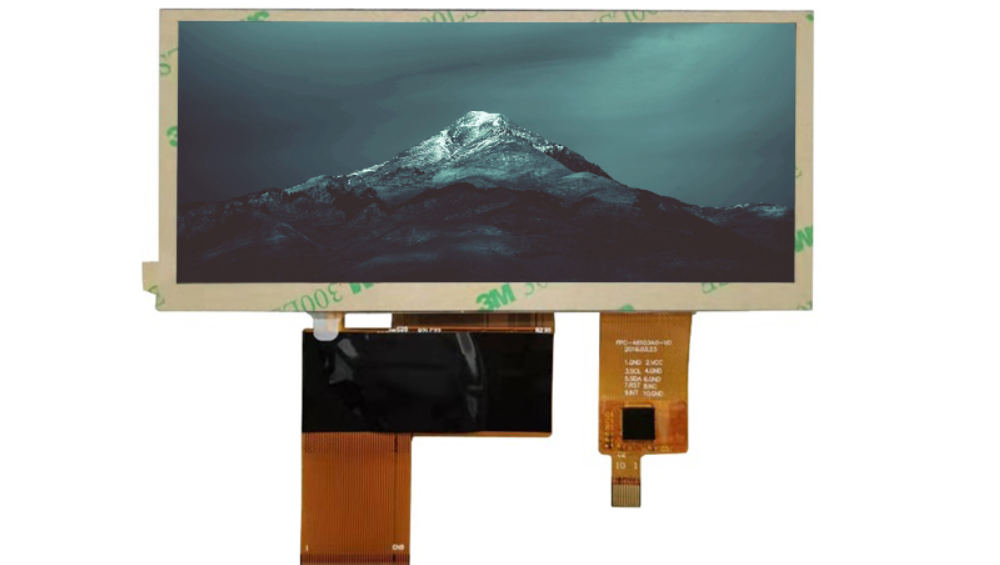
Choose an industrial LCD by fixing seven parameters first: size, resolution, brightness, viewing angle, interface, operating temperature, and backlight lifetime. Match them to the enclosure, the ambient light, the host processor, and the duty cycle, then verify the choices against a datasheet and a physical sample. CDTech returns custom samples in about four weeks when the specification is frozen.
Part of the Industrial LCD Displays guide — 41 articles on continuous duty, sealing and long service life outside the cabin.
This guide assumes that a TFT LCD has already been selected. It focuses on defining the module specifications rather than comparing TFT with OLED or character LCD technologies.
The selection process is not about finding the best panel; it is about finding the panel that fits one product’s constraints. A screen that impresses in a showroom can fail in a machine hall, and a datasheet that looks complete can still hide the numbers that matter.
Seven Parameters Define an Industrial Display
An industrial display is defined by seven parameters: size, resolution, brightness, viewing angle, interface, operating temperature, and backlight lifetime. No single parameter decides the product; the combination does. Write all seven into one specification so every supplier quotes against the same document.
The table below is the requirements matrix we use when a buyer sends us an inquiry. Fill in the “What to specify” column before contacting any supplier, and treat the “Evidence to request” column as part of the purchase contract, not a favor.
| Parameter | What to specify | Evidence to request | Risk if ignored |
|---|---|---|---|
| Size | Diagonal, active area, outline | Outline drawing with tolerances | Bezel and mounting rework |
| Resolution | Pixels and aspect ratio | Datasheet timing table | Blurry text or wrong interface |
| Brightness | Nits at a stated temperature | Luminance test report | Unreadable screen in ambient light |
| Viewing angle | TN or IPS, degrees | Viewing-angle curve | Legibility loss off-axis |
| Interface | RGB/MCU/SPI/LVDS/MIPI/eDP/HDMI | Pinout and timing spec | Host board incompatibility |
| Operating temperature | Range and response limit | Environmental test report | Field failure in cold or heat |
| Backlight lifetime | Hours and L70 definition | Derating curve | Premature dimming and maintenance |
The exact value for each parameter depends on the selected module. Typical industrial ranges are 3.5 to 21.5 inches, 320×240 to 1920×1080 pixels, 300 to 1500 nits, and −20 to +70°C or −30 to +85°C operating ranges; confirm the model-specific numbers in the datasheet rather than treating these ranges as guarantees. You can anchor your values against the standard industrial LCD lineup, and datasheet and specification files are collected on the downloads page.
Why Industrial Displays Differ From Consumer Panels
Industrial displays are built for continuous duty, wider temperatures, and longer service life, while consumer panels are optimized for cost under indoor conditions. A typical industrial module is specified for 50,000 to 70,000 backlight hours and a −20 to +70°C range; consumer monitors are commonly rated for shorter life and 0 to +40°C. Confirm both numbers in the model datasheet instead of assuming them.
The difference shows up in components, not marketing language. Industrial modules use driver ICs selected for long-term supply, connectors and FPCs designed for repeated assembly, and backlights that derate gradually instead of failing abruptly. A consumer screen showing a fixed menu for 16 hours a day will develop visible image retention; an industrial panel is chosen with panel and driver combinations that tolerate static content. If a product runs three shifts, these differences decide whether the display outlives the machine or becomes a scheduled replacement part.
Size and Resolution: Start From Readability
Choose resolution from the smallest text and the operator’s reading distance, not from a preference for higher pixel counts. A 7-inch 800×480 panel gives about 133 PPI, a 10.1-inch 1280×800 panel about 149 PPI, and a 21.5-inch 1920×1080 panel about 102 PPI; all three are readable at their typical working distances.
The practical method is to work backwards. For a machine operator standing about 70 cm away, 7 to 10.1 inches is usually the sweet spot; for a wall-mounted supervisory screen read at 2 to 3 meters, 15.6 or 21.5 inches at 1080p keeps the interface legible. Resolution also constrains the interface: below 800×480, MCU or RGB connections are common; at 1024×600 and above, LVDS appears; at 1920×1080, dual-channel LVDS or eDP becomes the norm. If the host processor only provides SPI, a 1080p panel adds a bridge chip and one more component to qualify, so define the processor and the display as one system.
Brightness and Viewing Angle: Beat the Worst Ambient
Set brightness from the worst ambient condition: 250–450 nits for offices, 600–800 nits for bright lobbies, and 1000–1500 nits for direct sunlight, then check contrast under that light. Reflection matters as much as nits; an anti-reflective coating or a bonded cover glass reduces surface reflection from roughly 5% to 1–2%, which often helps more than adding another 300 nits.
Viewing angle is a separate decision. TN panels are cheaper and faster but have a narrow 6/12 o’clock cone; IPS panels hold roughly 85/85/85/85 degrees and keep color stable off-axis. For a display mounted high on a cabinet or viewed from a moving position, IPS is usually worth the premium. For a fixed straight-on position in a cost-sensitive product, TN still has a legitimate place, provided the datasheet viewing-angle curve is checked against the actual mounting angle.
Which Interface Should Your Display Use?
Use the interface your host processor natively supports: SPI for small serial panels, RGB or MCU for medium panels, LVDS for 7–21.5-inch industrial panels, and MIPI or eDP for high-resolution or automotive designs. HDMI is an option when a standard source device drives the panel, with a receiver board in between.
Each interface carries real engineering weight. LVDS is the industrial workhorse: simple, mature, tolerant of longer cables, but limited to roughly 1080p. MIPI-DSI reaches 2K and beyond with fewer pins, yet demands impedance-controlled routing and short traces. eDP brings high bandwidth and thin cabling but adds link-training complexity. The most common failure at the engineering stage is not the interface type but the pinout: connector pin order, 6-bit versus 8-bit mapping, and backlight current are all customer-specific, so the pinout and FPC design belong in the specification.
Where Mechanical Fit Problems Actually Occur
Most display projects fail on mechanical fit, not optics: outline tolerance (typically ±0.3 mm), FPC exit direction, connector position, and bend radius are the usual culprits. A 0.3 mm FPC needs a bend radius of at least three times its thickness; folding it tighter risks cracked copper after repeated flexing.
Send the enclosure drawing, not just the panel requirement. With the bezel, mounting holes, and rear clearance in hand, a supplier can adjust FPC length, connector position, and cover glass shape before tooling starts. Every dimension left out becomes a guess, and guesses cause rework in pilot production. This is a practical acceptance criterion: the sample must fit the enclosure without forcing, and the FPC must route to the connector with clearance.
Backlight Lifetime: Read the Curve, Not the Headline
A 50,000-hour backlight rating is usually an L70 value at 25°C, meaning the time until brightness decays to 70% of its initial level. Lifetime falls as temperature rises, so request the derating curve and confirm brightness at your maximum operating temperature; the headline number alone is not a specification.
As a rule of thumb, LED lifetime declines roughly with rising junction temperature, and a display in an unventilated cabinet on a factory floor rarely runs at 25°C. If the product runs hot, budget for a higher brightness bin at the start, because a panel that starts brighter can afford more decay before it falls below the readability floor. Ask for the curve and the test conditions together, and confirm that the claimed lifetime was measured at a temperature close to your operating profile.
Certifications Narrow the Supplier List
Certifications filter suppliers before sampling: ISO9001 for quality systems, ISO14001 for environmental management, ISO13485 for medical traceability, and IATF16949 for automotive PPAP discipline. Verify the certificate scope and issue date rather than accepting a logo.
The practical effect is documentation. ISO13485 requires batch traceability and change control that a generic electronics shop does not maintain; IATF16949 brings APQP and PPAP paperwork that automotive customers need. CDTech states it holds ISO9001, ISO14001, ISO13485, and IATF16949 and runs a 10,000 m² facility with automated production and testing lines; the certificates held are listed on the quality certifications page. Before relying on any certificate, ask the supplier for the certificate copy and confirm the legal entity, scope, and validity period. This is an acceptance criterion, not a preference: if your end market is medical or automotive, the matching certificate should be a filter, not a negotiating point.
Sample Approval Checklist
Confirm MOQ, lead time, and sample terms in writing before ordering. For custom sizes, MOQ commonly starts around 500 pieces and custom samples around four weeks with 48-hour revisions on minor changes; confirm the numbers for your model because they depend on configuration. If your requirements matrix is ready, contact the CDTech team to check lead time, MOQ, and sample terms for your configuration.
- Set acceptance criteria before the sample arrives: luminance within a stated tolerance of the datasheet value at 25°C, no dead pixels beyond the agreed class, and interface compatibility with the host board.
- Check mechanical fit: the sample must fit the enclosure without forcing, and the FPC must route with clearance.
- For 24/7 products, require the backlight derating curve and confirm brightness at the maximum operating temperature before approval.
- Freeze a golden sample with photographs and measurements, and compare production units against it.
- Keep the itemized quote (NRE, tooling, MOQ, lead time) as the baseline for the production order.
Key Takeaways
- Fix the seven parameters before requesting quotes; every supplier should bid against the same document.
- Set brightness from the worst ambient condition and pair it with anti-reflection and bonding, not just more nits.
- Match the interface to the host processor, and put pinout and FPC geometry in the specification.
- Send the enclosure drawing early; mechanical fit, not optics, is where projects fail.
- Request the backlight derating curve and confirm brightness at your operating temperature.
- Filter suppliers by certificates that match your market, then validate a physical sample against written acceptance criteria.
Frequently Asked Questions
Which resolution do I need for a dense HMI?
Start from the smallest text and the reading distance. For an operator at arm’s length with dense tables, 1280×800 at 10.1 inches is a safe baseline; for a wall-mounted screen at 2 to 3 meters, go larger with 1080p.
Is 1000 nits always better than 500 nits?
No. Higher brightness costs power and heat. Choose the bin that beats the worst ambient with contrast to spare, and use anti-reflection and bonding before increasing nits.
Can I use a consumer monitor inside an industrial cabinet?
You can, but you inherit a shorter backlight rating and a narrow temperature range. For 24/7 duty and multi-year service, an industrial module with a 50k–70k hour backlight is usually cheaper over the product’s life.
How long does a custom industrial LCD sample take?
With a frozen specification, CDTech delivers custom samples in about four weeks and responds to minor revisions within 48 hours; bulk production follows in roughly three to six weeks after sample approval. Confirm exact timelines with the supplier.
Related articles
 Optical Bonding: OCA vs OCR Comparison for Rugged DisplaysIndustrial & Specialist Displays
 Solar Inverter and Combiner Box Displays: Readability in Direct SunlightIndustrial & Specialist DisplaysTransparent, Reflective and High-Ambient Retail Displays: Where LCD Still WinsIndustrial & Specialist Displays
 Passenger Information Displays for Buses and Trains: Standards, Readability and ReliabilityIndustrial & Specialist Displays