Robotics, Teach Pendants and Industrial Automation Interfaces
Teach pendant and robot HMI displays: drop and handling abuse, cable fatigue, gloved touch, cell lighting, welding EMC and defined fail states.
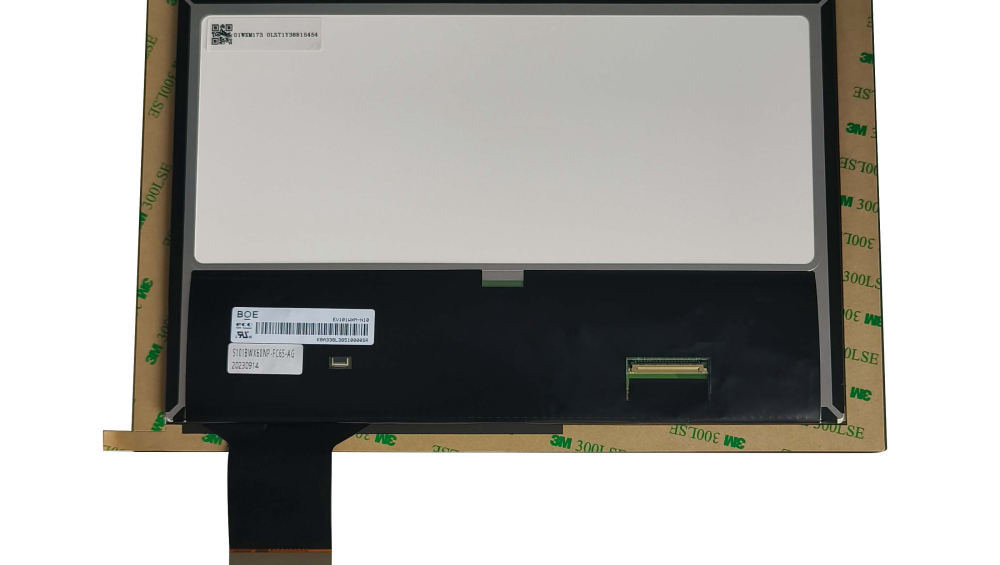
A teach pendant is the only handheld industrial display that gets dropped, sat on, dragged across a cell floor and used with oily gloves, often by several shifts a day for a decade. Its display is also part of a safety-relevant interface, where a frozen screen is more dangerous than a blank one. Those two facts set a specification that differs markedly from a cabinet-mounted HMI.
Pendant vs cabinet display: different design pressures
One is a handled instrument; the other is fixed equipment.
A cabinet HMI is judged on readability, sealing and service access, and its mass and impact resistance are secondary. A pendant is the opposite: it is handled, dropped and stored, so impact resistance, cable flexibility, connector durability and weight dominate. Its display must be small enough to hold, bright enough for a workshop or a lit cell, and robust enough that a fall onto a concrete floor does not end the shift. The two products rarely share a display solution even when they show the same software.
For fixed controllers, the priorities revert to the industrial norm; CDTech’s notes on 10.1-inch industrial display specifications are a useful reference for that class.
Drop, impact and handling abuse on a handheld pendant
The front surface takes the impact.
Pendants are dropped on corners, laid face down on benches and knocked against machinery. The failure modes are a cracked or chipped cover glass, a damaged bezel that no longer seals, and a display that still works but becomes unreadable because the surface is scuffed. The design answers are a recessed or protected front, chemically strengthened glass with a laminated backing so fragments are retained, and a bezel that absorbs the corner impact rather than transmitting it to the glass.
Where the front is bonded, the whole assembly is stiffer and more resistant, but a replacement is the complete front rather than a glass alone. That service model is usually acceptable for a handheld product because the repair is quick.
Cable fatigue and connector reliability
The cable outlives its bend rating long before the display fails.
A pendant cable is flexed, coiled, dragged and occasionally used as a handle. The failure appears at the strain relief or the connector: broken conductors, intermittent contacts and, eventually, a display that blanks when the cable is moved. The countermeasures are a defined bend radius, a strain relief that takes the load before the connector, a connector with a positive lock and a serviceable cable that can be replaced without replacing the pendant electronics.
Connector reliability under vibration and repeated mating is a documented failure area; CDTech’s material on connector and contact reliability and on FPC cable design covers the design measures.
Touch with gloves in a workshop
Pendant users wear gloves and press hard.
A capacitive panel tuned for the workshop’s gloves with large targets works for most interactions; resistive panels remain common in pendants because they tolerate gloves, dirt and a stylus, and because they continue to function when the operator presses deliberately. Where the pendant is used with oily or wet gloves, the surface coating and the controller’s rejection behaviour matter as much as the sensing technology.
The sensor and the front glass should be specified as one stack, since the thickness that survives a drop also reduces sensitivity. CDTech’s notes on custom touch panel construction describe how that stack is defined.
Readability in bright and dark cells
Cell lighting varies from daylight to dark corners.
A robot cell may have bright overhead lighting, a welding flash, or almost no light where the robot reaches into a machine. The pendant display must be readable across those conditions and must dim to a level that does not dazzle the operator when they look up from the screen. The specification therefore needs both a daylight contrast requirement and a low, flicker-free luminance floor, with a dimming control that is easy to operate with gloves.
Where the operator views the screen while looking into a machine, the reflection from the machine’s interior lighting should be checked in situ rather than on a bench.
Vibration transmitted from the robot itself
Holding a display near a moving machine is a vibration test.
A pendant is often held in one hand while the robot moves nearby, and occasionally hooked onto the cell structure, where it experiences the machine’s vibration directly. Cabinet-mounted displays see the same input with a stiffer mounting. The failure modes are the same as elsewhere – FPC fatigue, connector fretting, fastener loosening – and the same measures apply, with the addition that a pendant’s internal packaging must protect the display from the shock of being dropped while also surviving continuous low-level vibration.
Specify the vibration and drop requirements together, since the two impose different constraints on the same internal structure.
EMC near welding and high-current equipment
Welding is the worst case in most factories.
A robot cell may contain welding equipment, servo drives and high-current contactors, all of which inject noise into cables and the local field. For a pendant, the vulnerable paths are the long cable to the controller and the capacitive touch front end. Symptoms include video noise, touch faults and, in severe cases, resets. The countermeasures are a differential or shielded link with defined terminations, a single reference for the touch controller and separation from welding return currents – which in a welding cell requires careful thought about where the return path actually runs.
Testing with the welding process running is the only meaningful validation; a bench test with no aggressor will always pass.
Safety considerations when the display stops updating
A frozen screen is worse than a blank one.
Where the pendant shows robot position, mode or safety status, a display that freezes while appearing normal can mislead the operator. The design requirement is a defined fail state: on loss of communication, the screen should show an unmistakable indication rather than the last frame, and the controller should detect the pendant’s absence or failure. Brightness failure is the other case – a display that goes dark during a teach operation should be announced, not silent.
Documenting these states and testing them by fault injection is a small amount of work that materially changes the device’s safety behaviour.
Cobot and collaborative workspace interfaces
Collaborative robots change the interface rather than the display.
Cobots are often programmed through a lightweight pendant or a tablet-like interface, used by people who are not robot programmers, which favours larger text, clearer status indication and less data density. The display requirements are similar to a conventional pendant with more emphasis on readability at a glance and on the interface’s ability to show safety-relevant state – speed, mode and protective stop – clearly. Where the interface is a general-purpose tablet, the display’s environmental specifications are usually weaker than a purpose-built pendant’s, which is a consideration for cells with dust or coolant.
Where the cobot is used in a shared workspace, the interface should make the robot’s state visible to others in the area, which sometimes means a second display on the cell rather than on the pendant.
Specifying a display for a 10-year robot life
Write the requirement around handling and serviceability.
| Requirement | Specify |
|---|---|
| Impact | Drop height and surface, corner protection, laminated front |
| Optical | Readability under cell lighting; low-luminance floor without flicker |
| Touch | Glove type, dirt and oil tolerance, target sizes |
| Cable | Bend radius, strain relief, connector cycles and locking |
| Vibration | Profile from the robot cell, tested with the pendant assembled |
| EMC | Immunity with welding or drives running; grounding and shield termination |
| Fail state | Defined behaviour on loss of communication and on backlight failure |
| Service | Front assembly and cable replaceable in the field; replacement time |
Industrial safety and control-system practice is documented through platforms such as Rockwell Automation and Siemens, and the electrical safety framework for the finished machine in Europe includes the EMC Directive.
FAQ
What display is used in a robot teach pendant?
Most use a small to mid-size TFT module with a toughened or laminated front and touch tuned for workshop gloves, packaged to survive drops. The distinguishing requirements are impact resistance, cable and connector durability, and a defined fail state rather than high resolution.
Why do teach pendant cables fail so often?
The cable is flexed, coiled and dragged thousands of times, and the failure appears at the strain relief or the connector rather than in the middle of the cable. Defining a minimum bend radius, providing strain relief before the connector and making the cable field-replaceable convert a pendant failure into a cable replacement.
Should a pendant use capacitive or resistive touch?
Capacitive works well with thin gloves and gives better optical performance, while resistive panels tolerate thick gloves, dirt and deliberate pressure and remain common in pendants. The decision follows the gloves and the environment, and either way the sensor must be specified with the glass thickness.
What should a pendant display do if communication is lost?
It should show an unmistakable failure indication rather than freezing on the last frame, and the controller should detect the loss independently. A screen that continues to look normal while showing stale robot state is the most dangerous failure mode, and it is cheap to design out.
Next step
Send the pendant format, drop and vibration requirements, glove type and cell environment to CDTech; the reply will propose the display stack, touch technology and front protection for the handled product.
Contact sales@cdtech-lcd.com or use the contact page; small and mid-size industrial classes are listed under industrial LCD displays.
Related articles
 ESD Protection for Display Modules: Design, Test and Field RealityInfo
 Hydrogen, Gas and Chemical Process Displays: Where Certification Drives the DesignInfoResistive Touch Screens: Where They Still Beat Capacitive in 2026Info
 Haptic Feedback and Display UX in Industrial Equipment: When Touch Is Not EnoughInfo