What Should You Test When LCDs Arrive?
Incoming inspection is where a display shipment becomes your problem or the supplier's. Testing LCDs on arrival—packaging and ESD condition, visual quality, power-on behavior, electrical function, and dimensions—catches damage and defects before they enter…
Part of the Quality, Testing & Compliance guide — 34 articles on defect classes, inspection, qualification and certification.
How Often to Inspect and Who Should Do It
Incoming inspection follows the sampling plan agreed with the supplier: 100% inspection for high-risk or low-volume lots, sampling for steady production. Who inspects—your team, the supplier’s outgoing QC, or a third party—should be defined in the agreement, with the same plan applied at the defined point. Inspection frequency can relax as the supplier’s quality history improves, but only with data supporting the change.
Before You Open: Packaging, ESD, and Storage Checks
Inspect the packaging before opening: signs of impact, crushing, moisture exposure, or broken seals. Check ESD packaging integrity and any humidity indicators. If the packaging shows damage, photograph it before opening, because the carrier claim depends on the packaging evidence. Store unopened modules per the storage specification—temperature and humidity limits matter for modules that have traveled.
Visual Inspection: Cosmetic Defects and Polarizers
Visual inspection checks the module’s appearance under defined conditions: scratches, chips, dirt, and defects in the polarizer or glass, with the lighting and viewing distance from the inspection specification. Cosmetic acceptance follows the defect classes agreed with the supplier—what is acceptable in the active area versus the border differs. Conditions matter: the same panel inspected under different lighting produces different defect findings, so state the conditions in the plan.
Power-On Tests: Dead Pixels, Uniformity, and Flicker
Power the module and check the image: dead or stuck pixels against the agreed limits, brightness uniformity across the panel, and visible flicker or instability. Power-on checks need a warm-up period so the backlight and electronics stabilize before judgment. Uniformity and pixel findings belong in the report with the test pattern and viewing conditions, so both sides measure the same thing.
Electrical Tests: Interfaces, Touch, and Brightness
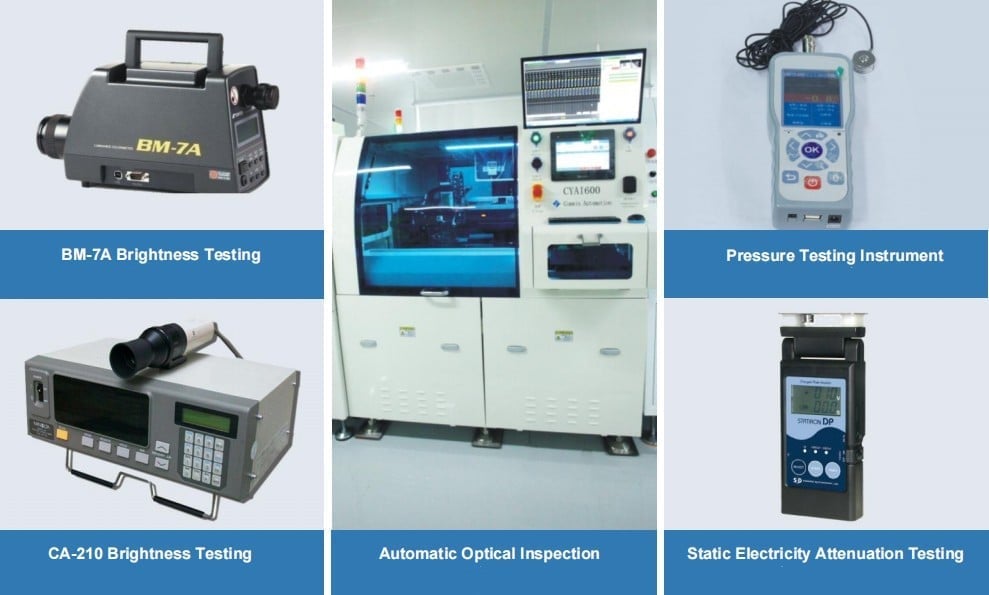
Electrical testing confirms the module works with the intended interface: signal integrity on the display interface, touch function and accuracy where touch is fitted, and brightness at the drive condition. Interface testing requires the host or test fixture the product will use; testing with a different interface can miss integration faults. Brightness measurements use the datasheet condition so results are comparable.
Dimensional Checks: Outline, Holes, and FPC Position
Measure the mechanical features that matter for assembly: outline dimensions, mounting holes, active-area position, and FPC or connector location against the drawing. Dimensional drift shows up as assembly problems later, so catching it at incoming inspection prevents line stoppages. Use the tolerances from the drawing and record measurements per sample.
Incoming Inspection Checklist: Tests and Records to Keep
- Packaging and ESD condition, photographed before opening.
- Visual inspection under defined lighting and conditions.
- Power-on checks: pixels, uniformity, flicker after warm-up.
- Electrical and touch function at the product’s interface.
- Dimensional measurements against the drawing.
Keep the records: lot identity, inspection plan, results, photos of defects, and the disposition decision. AQL sampling mechanics belong to the AQL guide; the incoming plan applies them at the receiving dock.
If you are setting up incoming inspection for LCDs, define the plan, conditions, and records before the first shipment. CDTech supports custom LCD quality programs across the custom display range—contact us to align your incoming inspection specification.
Related articles
 Second-Source Qualification for Display ModulesQuality, Testing & Compliance
 Second-Source Qualification for Display Modules Without Doubling Your Inventory RiskQuality, Testing & Compliance
 Incoming Inspection for Display Modules: What to Check and How OftenQuality, Testing & ComplianceEMC Certification for Display Products: Passing the First TimeQuality, Testing & Compliance